Table of Contents
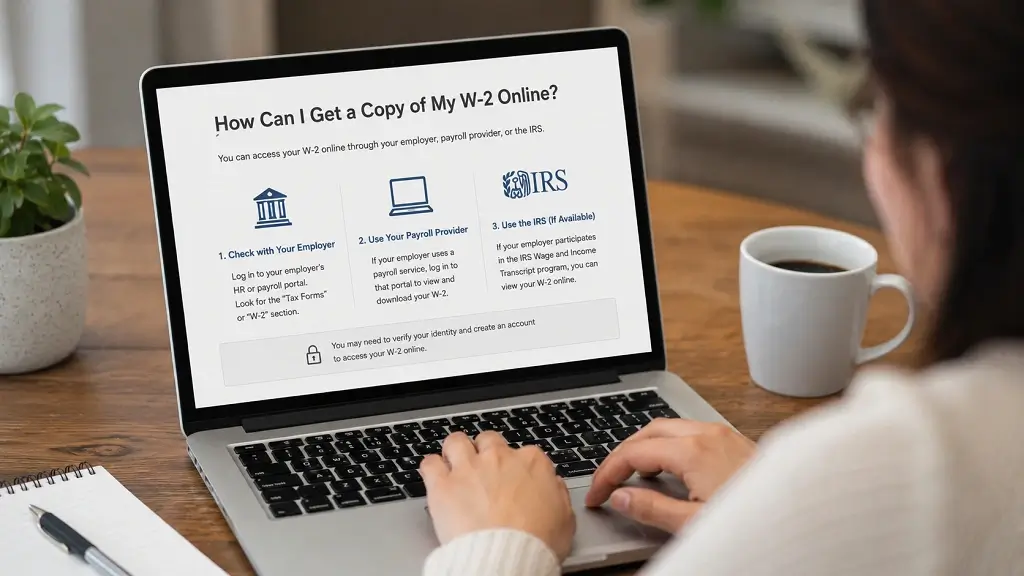
ToggleIf you’re searching for how can I get a copy of my W-2 online, you’re certainly not alone. Every tax season, millions of employees need another copy of their W-2 because they misplaced the original, changed jobs, switched addresses, or prefer downloading it digitally. Fortunately, obtaining your W-2 has become much easier than it was a few years ago. Most employers now provide electronic access through employee self-service portals, payroll companies, or integrated tax software.
The fastest way to do this would usually be through your employer or your payroll provider. In case this is not possible, the Internal Revenue Service will give you a Wage and Income Transcript from past tax years, although it may not always be a substitute for your original W-2 form. Choosing which method is best for you can help you save some time and prevent delays when you file your tax return. Based on current guidance issued by the Internal Revenue Service, Wage and Income Transcripts will usually be available for up to 10 years.
What Is a W2 Form?
A W-2 Form, officially known as the Wage and Tax Statement, is one of the most important tax documents employees receive each year. Employers use it to report your annual wages and the taxes withheld from your paycheck. This information includes federal income tax withholding, Social Security tax, Medicare tax, state income tax (where applicable), retirement contributions, and other taxable benefits.
Contrary to 1099 forms, which are usually issued to contractors and freelancers, the W-2 form is used for employees. This difference is very important because it will affect how your taxes are deducted and reported during the year. The understanding of 1099 vs W2 differences is vital for proper filing.
It is mandatory that your employer give you your W-2 within the prescribed time period by the IRS annually. Employers have started issuing their W-2s in digital form even before the physical copies are issued.
Is a W2 Form Your Tax Statement?
Yes. For most employees, the W-2 serves as the primary tax statement used when preparing a federal and state income tax return. It summarizes your earnings for the year and shows exactly how much tax has already been withheld.
The tax software relies on the data from the W-2 form to determine whether you owe any taxes or are entitled to a refund. Since the IRS receives the same wage data submitted by the employer via the Social Security Administration, the tax form should tally with the W-2 form.
If you had multiple employers during the year, you should receive a separate W-2 from each one. Be sure to include every W-2 when filing your return.
How to Get My W2 Online
There are several reliable ways to obtain your W-2 online:
| Method | Method | Method |
|---|---|---|
| Employer Portal | Current employees | Minutes |
| Payroll Provider | Current & former employees | Minutes |
| Tax Software Import | Returning users | Minutes |
| IRS Wage & Income Transcript | Older tax years | Several days |
For most people, the employer’s self-service portal remains the easiest and fastest solution. If you no longer work for the company, many payroll providers continue to offer former employees secure access for several years.
The IRS also offers Wage and Income Transcripts through your online IRS account or by mail. However, these transcripts don’t always contain all of the state and local information shown on the original W-2 and shouldn’t be viewed as an exact duplicate.
How To Get a W2 From Your Employer

1. Employer Portal
Employee portals that are secure for accessing your tax documents exist within many workplaces. Log in and browse through sections such as Payroll, Tax Forms, or Year-End Forms.
In case you have forgotten your login details, you can easily reset the password by using your email address or employee ID number. This is because most companies keep tax documents for many years.
2. Third-Party Payroll Providers
Businesses frequently outsource payroll to companies such as ADP, Paychex, Workday, Gusto, and similar providers. If your employer uses one of these services, you may already have an online account where your W-2 can be downloaded.
If you were a former employee, you would want to see if your payroll portal is still active before getting in touch with Human Resources.
3. Tax Software Import
Popular tax preparation software can often import your W-2 automatically after you verify your identity. This saves time and reduces typing mistakes when preparing your return.
Automatic import typically requires your employer or payroll provider to participate in the software’s import network.
4. IRS Wage & Income Transcript
However, if you fail to get your W-2 from any other source, then you will have to turn to the IRS itself for a Wage and Income Transcript, which will contain the wages that your employer reported to the IRS for the past ten years.
Keep in mind that a transcript isn’t an actual copy of your W-2. State and local wage information may be missing, and current-year information might not yet be available until employer reporting is complete.
How Can I Obtain a Copy of My W2 Online From a Previous Employer?
Getting a W-2 from a previous employer is usually easier than many people expect. Even if you no longer work for the company, employers are generally required to keep payroll records and provide employees with access to their tax documents. The first step is to contact the Human Resources (HR) or Payroll department and ask whether your W-2 is available electronically. Many businesses maintain employee self-service portals that remain active for former employees, allowing you to log in and download tax forms for several years after leaving the company.
But if the employer has hired an outside payroll service provider such as ADP, Paychex, Workday, or any other payroll service provider, then you may log in to your account using the same login credentials. If you don’t remember your username and password, then you should try using the account recovery options available or get in touch with the payroll service’s customer service. The employees generally help users in verifying their identity and granting them access to the account. Prior to that, make sure to have your Social Security number handy, along with your employee ID and your date of employment at the firm.
In cases when the employer goes bankrupt, merges with another company, or switches payroll services, try contacting its corporate office or the new entity. Should you fail to get a W-2 form from them, the Internal Revenue Service suggests requesting a Wage and Income Transcript via your IRS account. Even though the transcript will not be an exact copy of the W-2 form, it contains all the necessary information related to your wages and withholdings reported to the Internal Revenue Service. This approach is especially helpful if you need the information for tax periods several years ago and the original employer is hard to reach.
How Can I Obtain a Copy of My W2 Online With E-file Payroll?
If your employer uses an E-file Payroll platform, obtaining your W-2 online is typically quick and secure. Most cloud-based payroll systems are designed to provide employees with 24/7 access to important tax documents without waiting for a paper copy in the mail. After your employer finalizes year-end payroll processing, your W-2 is usually uploaded to your employee portal, where you can view, download, or print it whenever needed.
Accessing W-2 can be done by signing into the employee portal with their email address and password. The employee needs to go to the tabs like Tax Documents, Payroll, Year End Forms, or Employee Documents. Click on the desired tax year and then download the PDF copy of the W-2 form. Prior to downloading the document, ensure that your personal details are correct. It includes the name, social security number, and mailing address. In case you spot any discrepancies in the information provided, alert your employer.
The convenience factor is one of the main benefits of an online payroll system. Rather than waiting for the replacement forms via post, the employees can access their tax forms in seconds from anywhere around the world. Moreover, the digital format cannot get misplaced easily and provides security when it comes to archiving purposes. Most payroll service providers store tax documents for several years, which helps you retrieve past W-2 forms if needed.
Can I File Taxes Without My W2?
Yes, you can file your tax return even if you have not received your W-2, but you should first make every reasonable effort to obtain it from your employer. If the filing deadline is approaching and your employer has not provided the form, begin by contacting the Payroll or Human Resources department to request another copy. Sometimes delays occur because of incorrect mailing addresses, administrative errors, or technical issues with employee portals.
In case your employer still fails to deliver your W-2, and you have no means of accessing it via the internet, you need to reach out to the Internal Revenue Service. This will involve asking the IRS to communicate with your employer and demand the necessary documents. At the same time, you must furnish them with some basic information concerning your employer.
Submit Form 4852
In case you fail to get a copy of your W-2 despite making efforts, you can use Form 4852, which is a replacement for Form W-2. Here you will estimate your total wages, federal income tax withheld, and other details based on your last pay slip or payroll information. Form 4852 will ensure that you file your tax return on time, but it must be done after trying to obtain the actual W-2 form. In case you finally get the original W-2 form and find some difference between the estimated values and original values, then you have to amend your tax return through Form 1040X.
1099 vs W2: What's the Difference?
It is essential to understand the difference between 1099 and W2 since both have different relationships in terms of employment and tax filing requirements. Workers get the W-2, whereas independent contractors and some self-employed workers get the 1099 form for the earnings made during that year.
| Feature | W-2 Employee | 1099 Contractor |
|---|---|---|
| Employment Status | Employee | Independent Contractor |
| Tax Withholding | Employer Withholds Taxes | No Automatic Withholding |
| Social Security & Medicare | Shared by Employer and Employee | Paid by Contractor |
| Benefits | Often Eligible | Generally Not Provided |
| Tax Form | W-2 | 1099 Forms |
The first major difference is in the tax deductions that are made when using a W-2. When using a W-2 form, the employer will make deductions of the federal income tax, social security tax, and Medicare tax from every salary. When using a 1099 form, independent contractors are supposed to pay the taxes and self-employment tax themselves every quarter.
It is also crucial to understand the difference in the benefit packages. While working under a W-2 form, one might be provided with health insurance, retirement programs, vacations, and unemployment benefits. On the other hand, 1099 contractors deal with these aspects themselves.
Practical Advice for Obtaining Your W2 Form Online
If you are ready, then getting your W-2 over the internet will be easy for you. Always keep your login information handy as an employee all year long so that when tax time comes around, you can get your W-2 easily. Choose to receive your W-2 electronically if your company provides that option.
It’s also a good idea to keep your contact information updated with your employer. An outdated mailing address or email address can delay receiving important tax notifications or replacement login instructions. Before the end of each year, verify that your employer has your current address, phone number, and email on file.
Lastly, be sure to download and keep a copy of your W-2 every year, regardless of having filed your tax return. Save the digital copies in an encrypted cloud storage account or a password-protected device, and you may want to have a hard copy of it among other financial documents. It will help you save much time when filling out loan application forms or income verification for future jobs.
Common Reasons You Can't Access Your W-2
If you are not able to retrieve your W-2 from the online portal, do not stress out. In most instances, the problem is only temporary and will resolve if you talk to your employer or payroll service. Knowing the most common causes for such difficulties will help you solve the problem faster.
The most common problem is wrong login details. If you have forgotten your username or password, try to restore your password through the link provided at your company’s payroll site. Usually, you have to verify your identity before being able to change your password. In case you have locked your account due to failed logins, get help from your company’s HR/payroll department.
Another common reason is that your employer hasn’t yet published your W-2. Although employers are generally required to provide W-2 forms by the IRS deadline, electronic copies may not appear in employee portals until payroll processing is complete. If you recently changed jobs, your W-2 might still be mailed to the address your employer has on file. Make sure your mailing address is current to avoid unnecessary delays.
It should be noted that former workers may also not have access to the company’s portals after leaving the organization. In such cases, the organization itself can help by giving you a temporary login, sending it to you via email, or mailing it to you. If the company has switched its payroll provider, closed down, or something similar, contact HR of that organization, or get a Wage and Income Transcript from the IRS.
When to Contact the Internal Revenue Service
If you’ve tried several times but can’t receive your W-2 from your employer, it might be the right time to contact the Internal Revenue Service (IRS). However, first, make sure you’ve done so only after the deadline for distributing the W-2 forms has passed.
When contacting the IRS, be prepared to provide:
- Your full name, address, and Social Security number.
- Your employer’s name, address, and phone number.
- Your dates of employment.
- An estimate of your wages and federal tax withholding, which you can usually find on your final pay stub.
The IRS may contact your employer to remind them of their obligation to provide your W-2. If you still haven’t received the form before the tax filing deadline, you can use Form 4852 as a substitute for Form W-2. This allows you to file your tax return on time using reasonable estimates based on your payroll records. If the original W-2 later arrives and the information differs, you should file an amended return if necessary.
To Sum It Up
Getting access to your W-2 form via the internet has never been more convenient than now. The vast majority of employers allow for secure access via internet means by offering employees the ability to access their personal information via an online portal or a third-party payroll provider. In case there is no internet access, HR will be able to help you out.
For previous employers, payroll service providers often maintain historical tax documents for several years. When those options aren’t available, the Internal Revenue Service can provide a Wage and Income Transcript for prior tax years. Although it isn’t an exact copy of your W-2, it contains the wage information needed to help prepare your tax return.
In case the W-2 form is not received by the deadline day for its submission, it is possible to use the 4852 form in order to estimate the income and withholding based on the final pay stub. Though the usage of the 4852 form should not be regarded as the first choice, it allows the taxpayer to file his taxes on time and meet the IRS’s requirements.
Whether the taxpayer is trying to compare 1099 vs W-2 or wants to retrieve the missing tax form, it is useful to organize the necessary documents and keep electronic copies of 1099 and W-2 forms.
Frequently Asked Questions
Can I get my W-2 online immediately?
Yes. If your employer or payroll provider offers an online employee portal, you can usually download your W-2 as soon as it has been issued.
Can I get my W-2 directly from the IRS?
The IRS does not provide an exact copy of your current-year W-2. However, you can request a Wage and Income Transcript for previous tax years through your IRS online account.
What if I lost my W-2 after filing my taxes?
Another copy can be obtained from your employer or downloaded from your payroll website.
Can I file my taxes without my W-2?
Yes. If you cannot obtain your W-2 after contacting your employer and the IRS, you may use Form 4852 as a substitute to file your return.
What is the difference between a W-2 and a 1099 form?
A W-2 is issued to employees and reports wages and taxes withheld by an employer. 1099 forms are generally issued to independent contractors and self-employed individuals, who are responsible for paying their own taxes.