
Skip to content Skip to footer

File 5498 Online

Effortlessly report 2025 IRA contributions, rollovers, and FMV with E-File Workforce Payroll. A comprehensive system designed to streamline your entire E-Filing.

File 5498 Online
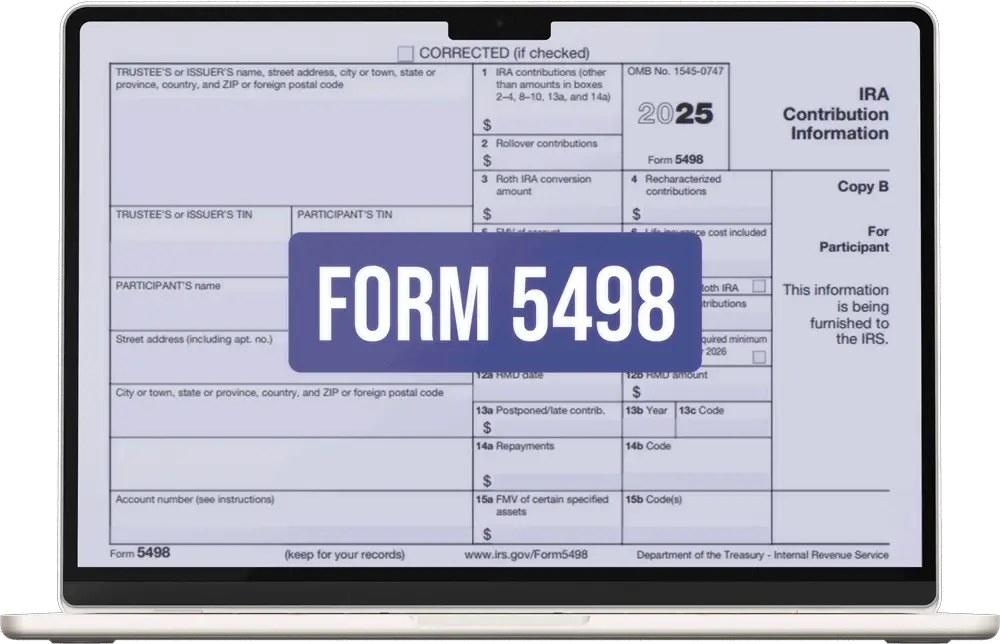
Form 5498

What is Form 5498?

Form 5498, “IRA Contribution Information,” is an IRS tax document used to provide details about contributions made to Individual Retirement Accounts (IRAs). The document contains all tracks of transactions made to an IRA, including:

  • Traditional, Roth, SEP, and SIMPLE IRAs.
  • Rollovers: Reporting funds moved from employer plans to IRAs.
  • Fair Market Value (FMV): Reporting the account value as of December 31, 2025. Required even if no contributions were made.
  • RMD Information: Checking Box 11 to notify the IRS and the participant that an RMD is required for 2026.

Purpose of Form 5498

The primary purpose of Form 5498 is to provide a clear track record of all transactions (contributions) made to IRA accounts. It’s used by IRA trustees or custodians (financial institutions) to report contributions made to various types of IRAs (individual retirement accounts).
This includes tracking contributions made during the tax year and those made between January 1st and the tax filing deadline of the following year.

When is Form 5498 Issued & Deadline

Filing Type Deadline
Participant Copy (FMV & RMD Only) February 2, 2026 (Jan 31 is a Saturday)
Participant Copy (Contributions/Rollovers) June 1, 2026 (May 31 is a Sunday)
IRS Filing (Electronic or Paper) June 1, 2026

Form 5498 IRA Contribution:

It is essential to note that 5498 is all about contributions made to IRAs. That is way different from Form 1099-R, which is used to report distributions from IRAs. Form 5498-SA serves a similar role by reporting contributions to HSAs and MSAs.

Form 5498 Instructions to File Through E-File Workforce Payroll

Individuals don’t need to file Form 5498 on their Form 1040 with the IRS. The form is for record purposes only. However, if you are a trustee or a financial institute, the guidelines will help you effortlessly file Form 5498:

  • Account Creation: Create an account with E-File Workforce Payroll and log in.
  • Form Selection: From the left menu, select Form 5498.
  • Filling up Details: In addition, select your filing year and submit all required information.
  • Form Submission: Once completed, you can submit the form and send a copy B to the recipient. 
Form 5498 Instructions

Have Questions?
Simpler than you think!

    0/300

    Upload File Here:

    captcha

    Frequently Asked Questions: IRS Form 5498

    Form 5498 is an IRS document used to report contributions made to IRAs by individuals. Trustees and financial institutions that keep IRAs file this form and provide copies to individual recipients as well.

    As an individual, you will not need this form for tax purposes. However, its a crucial informational document that you must keep.

    You do not physically attach or enter the data from Form 5498 onto your Form 1040 or any other tax form that you file with the IRS. The primary place for Form 5498 is in your personal tax records. You should keep it for your own documentation.

    Use it to verify the contributions made to your IRAs, track the fair market value of your IRA accounts, and confirm rollovers or conversions. You can further use this information for future tax years, especially when calculating RMDs and the taxable portion of IRA distributions. 

    Form 5498 tracks money going in (contributions/FMV), while Form 1099-R tracks money coming out (distributions). You need the 1099-R to file your taxes. And the 5498 is just for your records.

    Use an IRS-authorized provider like E-File Workforce Payroll. Our 5498 e-filing module allows you to import data and transmit it securely to the IRS FIRE system.

    Single Platform - Multiple Forms – Few Clicks

    Testimonial

    Subscribe to the exclusive updates!

      Call Now