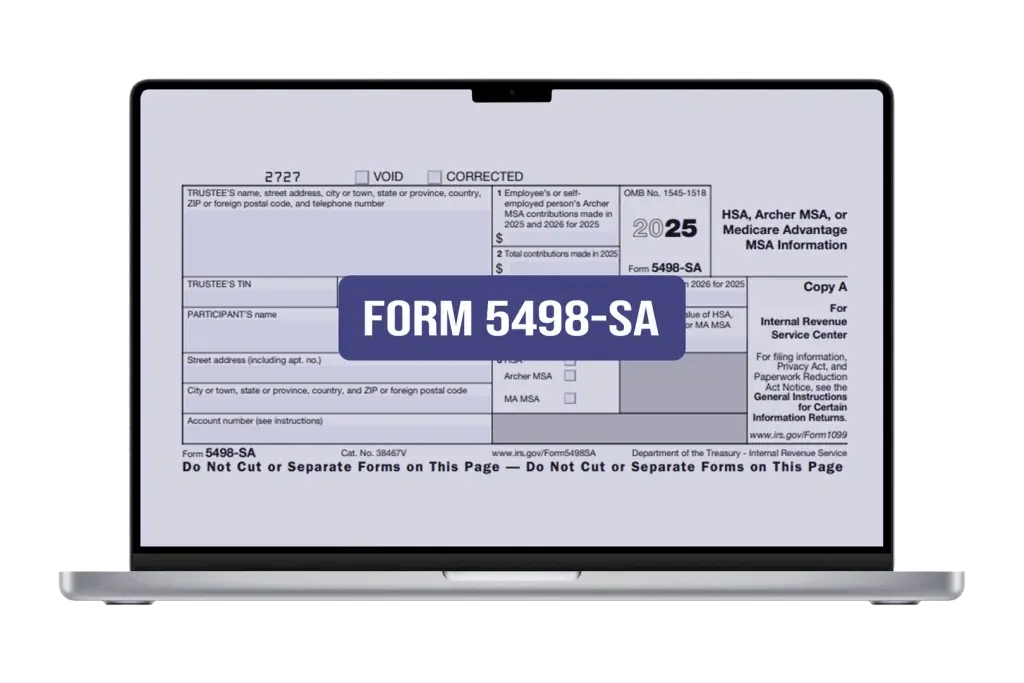
File 5498-SA Online
Forget tiring paper filing and switch to modern, seamless and automated e-filing system with E-File Workforce Payroll to file 5498-SA online.
What is Form 5498 SA?
Form 5498-SA is a tax document used to report contributions made to certain health-related saving accounts. It is titled as: “HSA HSA, Archer MSA, or Medicare Advantage MSA Information”.
Quick Note: You will receive Form 1099-SA to report any distributions used for medical expenses. Similarly, for retirement accounts, you will get Form 5498 to track your IRA contributions.
Who Files 5498-SA Tax Form?
Tax form 5498-SA is filed by:
- Banks
- Credit unions
- Other financial institutions
For trustees and custodians of HSA, MSA and Archer MSAs, it is necessary to file separate forms for each person for whom they maintain any of these accounts in a calendar year.
Penalties for Tax Form 5498-SA Late Filing
The IRS imposes penalties on trustees and custodians who file tax form 5498 SA late or don’t file at all.
- Filed within 30 days of the due date: The penalty is $60 per return with a max of $239,000 in total.
- Filed before August 1: The penalty increases to $130 per return with a maximum of $683,000 in total.
- Filed after August August 1 or not filed at all: The penalty further increases to $340 per return. Maximum penalty is $1,366,000.
- Failure to File: If it’s an intentional failure to file IRS impose $680 per return (for 2025). Also, there is no maximum penalty in this case.
Note: The IRS may also charge interest on penalties depending on the amount and delay.
Form 5498-SA Due Dates:
The IRS has the same deadlines for the 5498 SA form for both paper filing and electronic filing.
- Paper filing: By May 31, 2026(or June 2, 2026)
- Electronic filing: By May 31 2026(or June 2, 2026)
Quick Note: Some sources might mention the 30th June deadline for e-filing. However, the IRS has generally stated May 31 (or the next business day) for both paper and electronic filing for Form 5498-SA.
Form 5498-SA & Instructions
The IRS encourages electronic filing of tax forms. You can use E-file Workforce Payroll for this purpose. Here is step-by-step process:
- Sign up for an E-file Workforce Payroll account or log in if you already have one.
- From the main dashboard, select “Filing” and then choose “Start New Filing” from the drop-down.
- Put your filing year and form type and submit.
- A new form with all required fields will appear on the screen. Provide the information and submit it.
That’s all! You can repeat the process for each form one by one.
Have Questions?
Simpler than you think!
Form 5498-SA: Common Inquiries and Responses
Gather all the necessary details, including the employer’s details, business details, total tips received, and general information about the business. Fill all the details in the respective fields and ensure no data is incorrect. Further, be sure tips received must be 8% of the gross receipts. Any less than 8% will not require filing of 8027 from.
Testimonial
If you seek the most reliable and affordable e-filing platform, we ensure only a few can match the standards and rates set by E-File Workforce Payroll. They are experienced, informed, professional accountants and web developers who understand the US payroll form filing system and comprehensively fulfil all professional accountants’ requirements.
Alastair BrookManager
Today is a challenging world. With a conventional tax form filing system, it has not been possible for my firm to deal with multiple employees. While exploring top-ranked e-filing applications, I found them inefficient. So, I chose cloud-based E-File Workforce Payroll. This application is efficient and user-friendly. More importantly, I can manage my employees’ payroll even on my vacations.
Highly Recommended!
Business Owner
E-file Workforce Payroll is secure and efficient, and it allows me to easily access and submit multiple payroll forms with features like IP restriction and multi-user access for my team. It’s also been a big help in ensuring accuracy, as I can easily file corrected and void forms whenever necessary.
Highly Recommended!
Business Owner